Ads Automation
Ads Automation is where AMZSeller runs your Amazon Ads for you — day and night, on a schedule you define, following rules you set once. Think of it as a set of small autopilots you can bolt onto any campaign, ad group, or ASIN, in any combination.
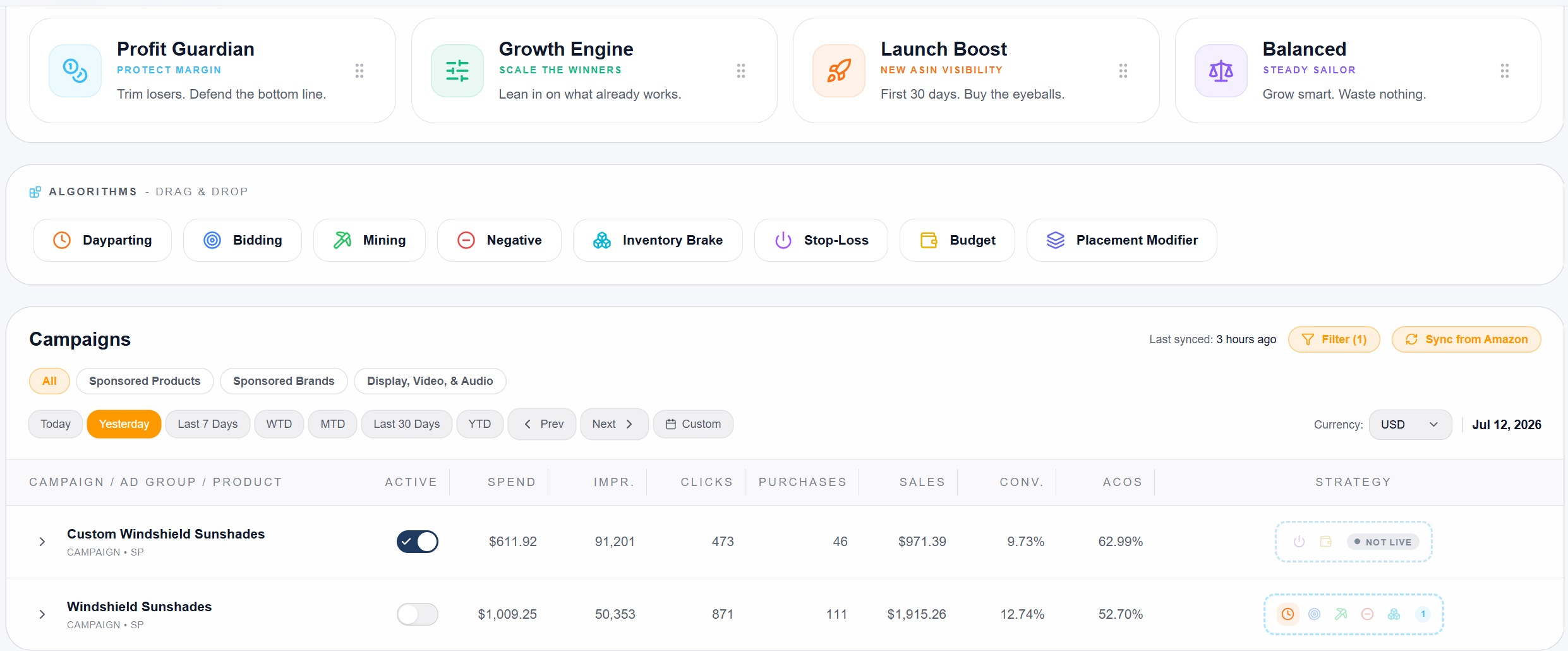
Sponsored Products only, for now. Every algorithm in this section is written for Sponsored Products campaigns. The Sponsored Brands and Display, Video & Audio tabs are visible in the campaign tree, but selecting them will show a "not supported yet" notice — those ad types are on the roadmap.
The one-page workflow
Everything happens on a single page — Advertising → Automation. There are no tabs, no sub-apps, just one canvas that reads like a game board:
- Pick a tool from the top strip — either a Strategy (a bundle of algorithms with default settings) or a single Algorithm.
- Drop it onto a row in the campaign tree below — a campaign, an ad group, or a product ad.
- Click the badge that appears on the row to open the configuration modal.
- Configure and launch — the automation goes live on Amazon.
That's the whole loop. Everything else — strategies, scoping, monitoring — is a variation on it.
On mobile the drag-and-drop turns into tap-to-select-then-tap-a-row. Same idea, one finger at a time.
The three moving parts
- Strategies — reusable bundles of algorithms with default settings, that you can drop wholesale onto a target. You build these yourself in the Strategies strip.
- Algorithms — the eight individual automations. You can drop them one at a time when you don't want a full strategy.
- Campaign Tree — a live view of your Amazon ads (campaigns → ad groups → product ads), with metrics for the currently selected date range and a Sync from Amazon button to pull the latest state.
The eight algorithms
| Algorithm | What it does |
|---|---|
| Bidding | Adjusts keyword and target bids toward a target ACoS, with performance tiers and safety rules. |
| Dayparting | Turns campaigns / ad groups / product ads on and off by hour-of-week. |
| Budget | Rewrites daily campaign budgets once a day based on day of week and performance criteria. |
| Stop-Loss | Pauses under-performers when your criteria are met; auto-resumes when they recover. |
| Mining | Promotes converting search terms into new keywords in your chosen ad groups. |
| Negative | Adds negatives from bad search terms and from your own blacklists. |
| Placement | Adjusts Top of Search / Product Pages / Rest of Search bid modifiers by rule. |
| Inventory Brake | Pauses product ads for SKUs that are about to run out of stock. |
Each has its own dedicated help page under Algorithms in the sidebar.
What activates when
Every algorithm inside an assignment has its own enabled / paused state — that's the single run gate. Off = that algorithm is dormant. Other algorithms in the same assignment keep running independently.
Fresh drops start paused. Nothing goes live on Amazon until you open the assignment, review the settings for that algorithm, and click Launch to Amazon. Paused algorithms show up on the row badge with a grey, dashed style so you always know at a glance which ones are actually running.
How the tree stays fresh
Two independent things get synced:
- The tree structure (campaigns, ad groups, ads and their names) is refreshed once a day by a background sync at ~04:00 UTC. If you create a new campaign in Amazon or rename something between syncs, hit Sync from Amazon in the tree toolbar to pull the change immediately.
- The performance metrics on each row — spend, clicks, impressions, orders, sales, ACoS — are the same numbers your Dashboard uses. They refresh every hour, on the same schedule as the Dashboard's ad-spend pipeline. There's nothing to click; the values update on their own.
So the tree layout is a daily snapshot with an on-demand refresh button, while the numbers on it are always at most an hour old.
Where to go next
- New to the terminology? Read Core concepts first — it explains Strategy, Algorithm, Assignment, Run, Decision and the wizard-vs-monitoring states.
- Applying automation to specific rows? See Scoping & inheritance — where you drop matters, and child rows can override parents.
- Want to bundle several algorithms into a reusable strategy? See Strategies.
- Ready to configure something? Jump into the algorithm you want — each has its own page.
- Wondering what happened last night? See Monitoring & decisions.