Campaign settings
At the bottom of the review page sits the Campaign settings block — everything that applies to the campaign as a whole rather than any single ad group.
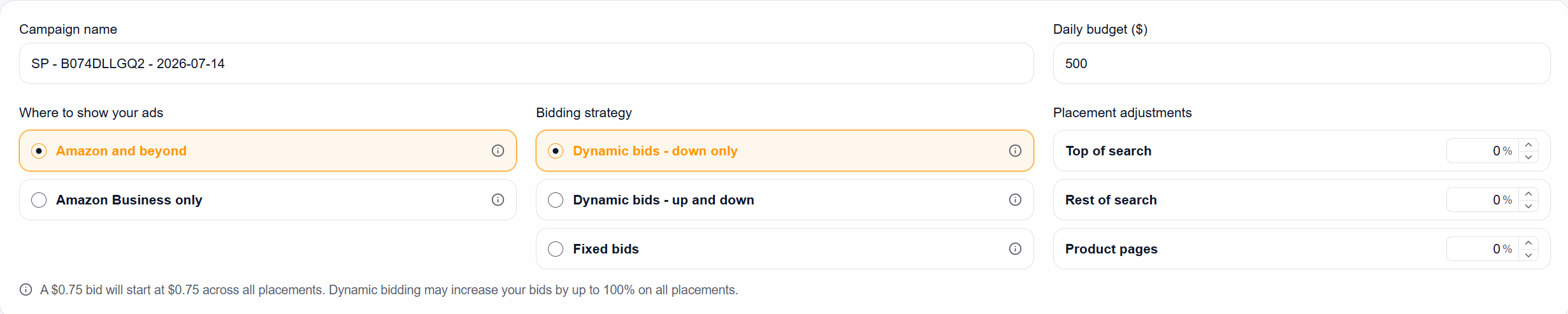
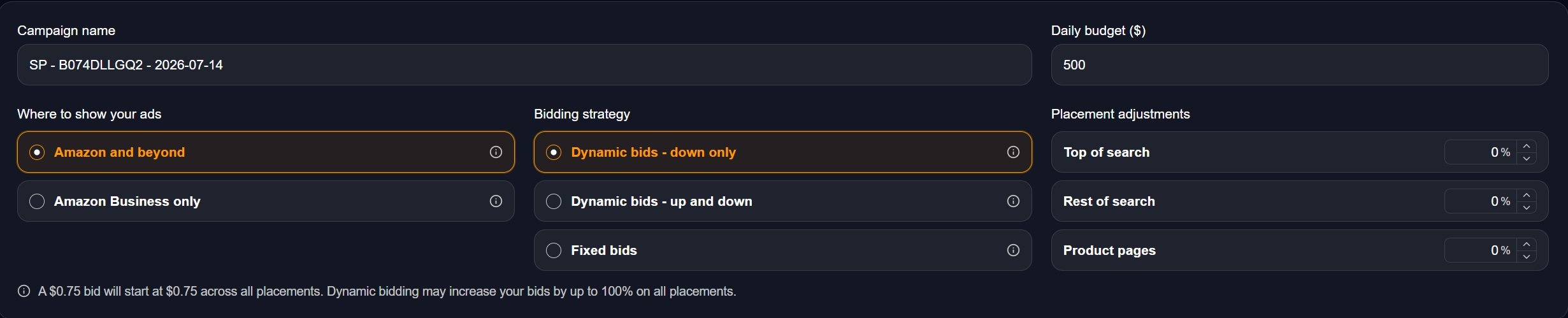
Every field here auto-saves the moment you leave it (or click a toggle).
Campaign name
Default: SP - {ASIN} - {YYYY-MM-DD} — e.g. "SP - B08N5WRWNW - 2026-07-13". It's designed to stay obvious in your Amazon campaign list.
Feel free to override it, but keep it descriptive — Amazon lets you use up to 200 characters. Naming conventions matter more than you think six months from now when you're trying to find one campaign in a list of eighty.
Daily budget ($)
Starts empty (0). The field is bordered red until you set a real value — and the Launch to Amazon button will refuse to fire with the message "Please set a daily budget before launching the campaign."
Minimum: $1. There's no maximum on our side; Amazon has its own account-level rules.
Think of the daily budget as "the most this campaign can spend on a single day before Amazon stops showing it for the day". Amazon may under-spend on any given day (they usually do) but they won't over-spend.
Where to show your ads
Two radio choices controlling where Amazon serves the ads:
- Amazon and beyond (default) — "Ads appear on Amazon retail and Amazon Business, plus select sites and apps off Amazon." This is Amazon's own default too. Broadest reach.
- Amazon Business only — "Reach business shoppers exclusively on Amazon Business with a B2B strategy." Only available in marketplaces where Amazon Business is a real thing (US, CA, MX, UK, DE, FR, IT, ES, IN, JP, AU). Hidden entirely in unsupported marketplaces.
Amazon Business only makes sense if your product is genuinely B2B-oriented (bulk supplies, industrial, professional-grade tools, etc.). For consumer products, leave it on Amazon and beyond.
Heads up: Amazon locks the sites setting after launch. You cannot change this on an already-launched campaign — you'd have to create a new campaign.
Bidding strategy
Three radio cards:
- Dynamic bids — down only (default) — "Amazon lowers your bids in real time when a click is less likely to convert." The safest option. Your set bid is a ceiling; Amazon will pay less when it thinks the click won't convert, never more.
- Dynamic bids — up and down — "Amazon raises or lowers your bids in real time based on conversion likelihood." Higher potential upside — Amazon can pay up to double your bid for a high-conversion moment — but requires more trust in Amazon's model.
- Fixed bids — "Amazon uses your exact bid for every opportunity, with no real-time adjustment." Maximum control, no dynamic behaviour. Rarely the best choice long-term but useful for pure A/B testing.
Most sellers start with down only and switch to up and down once the campaign has enough conversion data (typically 4–6 weeks in).
Placement adjustments
Amazon serves your ad in three different placements, each with a bid multiplier you control:
- Top of search — the top strip of search results. The most competitive, highest-CPC slot, but usually the highest-converting one.
- Rest of search — everywhere else in the search results.
- Product pages — the sponsored slots on other products' detail pages.
Each has a percentage input (0–900%, step 1%). The multiplier applies on top of your keyword-level bid:
- 0% — Amazon uses your bid as-is.
- 50% — Amazon bids 150% of your base bid for that placement.
- 200% — Amazon bids 300% of your base bid for that placement.
Campaign Builder starts every placement at 0%. This is deliberate: without conversion data you can't know which slot is your golden slot, and blindly pushing +50% on Top of Search out of the gate is the fastest way to burn through your budget on unproven traffic.
An Info note below the placement inputs explains the interaction with dynamic bidding:
A $0.75 bid will start at $0.75 across all placements. Dynamic bidding may increase your bids by up to 100% on all placements.
Once your campaign has been live a couple of weeks and you know which placements convert, either come back and set these manually, or let the Placement Modifier algorithm manage them for you automatically.
Common questions
What's a good starting daily budget?
It depends on your product's CPC, target ACoS, and how aggressive you want to be. A reasonable rule of thumb is to size the budget so the campaign can afford enough clicks in a day to actually gather data — a rough guideline is at least ~20 clicks/day, i.e. roughly 20 × your average CPC. Set it too low and the campaign will exhaust its budget early in the day and miss the peak evening traffic, which is exactly when Amazon shoppers convert the most.
Should I turn on Amazon Business only if my product could be used by businesses?
Only if the majority of your buyers actually are businesses. Amazon Business is a much smaller audience — you'd be trading a big pool for a small one. For dual-use products, leave it on "Amazon and beyond" and let Amazon serve business shoppers alongside everyone else.
Can I use "up and down" from day one?
You can, but conversion-based dynamic bidding needs conversion data to be smart. In the first two weeks the algorithm is basically making educated guesses. Start on "down only" and switch after you have real traffic to learn from.
Placement modifiers over 900% — is that even possible?
Not in AMZSeller. The field caps at 900% because Amazon's own API caps there too. In practice anything above 200% is aggressive; over 400% is very rare and only makes sense for extreme situations (a specific placement you know converts at 3x the rate of the others). If you set a modifier above 400%, an informational note appears under the inputs — it doesn't block anything, it just asks you to confirm the value is intentional.