Rules & the daily digest
Alerts and the morning email are two sides of the same coin — one lives in the app, the other in your inbox, but both are driven by the same rules panel. This page covers both.
The Watch Alert Rules panel
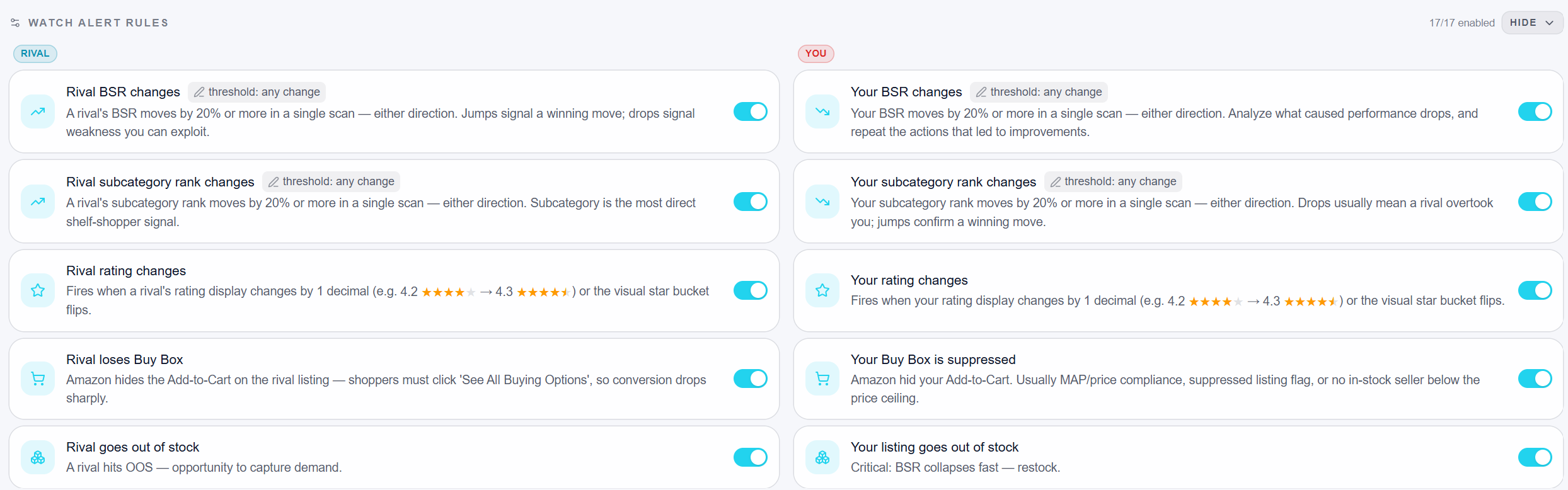
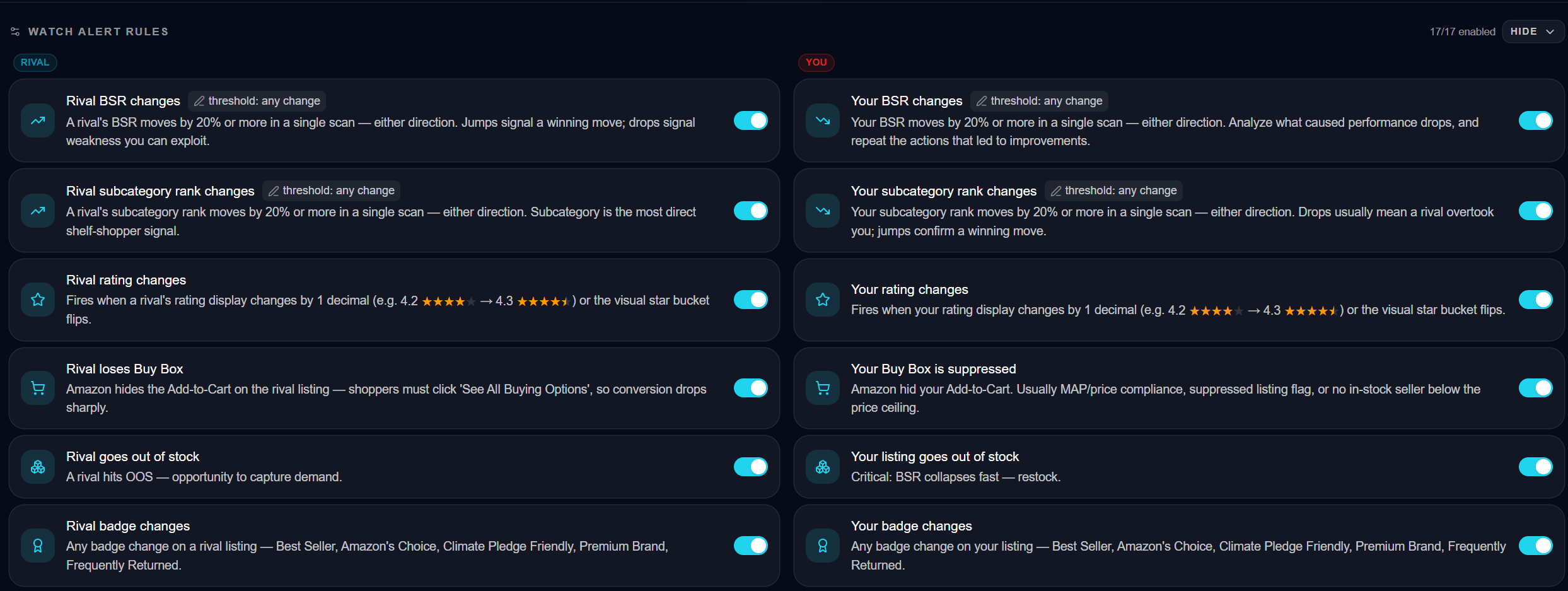
Every group has its own Watch Alert Rules panel near the bottom of the detail page. Rules are per-group — turning something on in Group A doesn't affect Group B.
Each row is one rule. Columns are:
- Enabled — the master toggle for that rule.
- Rule — a plain-English name, e.g. "Rival went out of stock", "Rival dropped below your price".
- Applies to — either Rival (fires when a rival changes) or YOU (fires when your own listing changes).
- Polarity — Opportunity / Risk / Info. Fixed per rule, not editable.
- Threshold — for rules that need one (e.g. "BSR moved by X positions", "Rating changed by X stars"). Leave at 0 to fire on any change; set higher to filter out noise.
- Suggested action — the one-liner shown on the alert. Not editable in the current version.
Changes save immediately — there's no separate "Save" button.
Default ruleset
Every new group starts with the same defaults enabled:
Price & offers
- Rival dropped below your effective price (Risk).
- Rival raised their price above yours (Opportunity).
- Rival added a coupon / lightning deal (Risk).
- Rival removed a coupon / deal (Opportunity).
Badges
- Rival gained Best Seller / Amazon's Choice (Risk).
- Rival lost Best Seller / Amazon's Choice (Opportunity).
- You gained / lost a badge (Info, YOU-scoped).
Stock
- Rival went out of stock (Opportunity).
- Rival returned to in-stock (Risk).
- You went out of stock (Risk, YOU-scoped).
Buy Box
- Rival lost the Buy Box (Info).
- Your Buy Box got suppressed (Risk, YOU-scoped).
Reviews
- Rival gained a spike of new reviews (Risk, threshold in reviews-per-day).
- Rival's average rating dropped by X stars (Opportunity, threshold).
Listing
- Rival changed their title (Info).
- Rival changed their main image (Info).
BSR
- Rival's BSR improved by X positions (Risk, threshold).
- Your BSR dropped by X positions (Risk, YOU-scoped, threshold).
Leaderboard (auto Top 5 / Top 10 groups only)
- New entrant joined the top N (Info).
- A rival exited the top N (Info).
Everything is enabled by default; the defaults are deliberately noisy so nothing gets missed on day one. Turn things off as the noise-to-signal ratio becomes clear.
Tuning the noise
Two knobs matter:
- Thresholds — most numeric rules default to a sensible cutoff (e.g. BSR moves of 500+ positions, not every 1-position wobble). Bump them higher on volatile categories, lower on stable ones.
- Polarity filtering — if you only ever action Risk alerts, tab-filter the Watch Alerts panel to Risk and leave Opportunity / Info in the background.
The daily digest email
The digest email is the once-a-day summary of everything that happened across every group.
- Subject line —
Rival Watch daily digest · {date}. - Send time — 07:00 marketplace-local time for each group, delivered in a single consolidated email per user.
What's in the email
For each of your groups:
- Group name and marketplace flag.
- The AI Daily Digest paragraph (same as on-screen).
- A short bulleted list of the top Risk and Opportunity alerts from the last 24 hours.
- A link back to the group detail page.
Groups with zero activity in the last 24 hours are still included but collapsed to a one-liner ("Nothing worth flagging in the last day.").
Opting out
Rival Watch emails have their own dedicated switch:
Profile → Email Notifications → Daily Rival Watch digest
Turn it off and the daily email stops. The tool keeps running — alerts still land in the app, digests still appear on the group pages — you just won't be emailed. The unsubscribe link at the bottom of any digest flips the same switch, and works without logging in.
There is no per-group email toggle; the setting is account-wide.
Interaction between rules, alerts and the digest
It's worth being explicit about how the three surfaces relate:
- Timeline — every observed change, unfiltered.
- Watch Alerts panel — timeline events that matched a rule.
- Digest email + AI digest text — a once-a-day summary of the last 24 hours of alerts and top-signal events, written in prose.
Turning a rule off silences the alerts panel and the digest email for that signal, but the timeline continues to record everything. Nothing is lost — only what gets surfaced changes.