Lead times
Lead times are the two most important numbers you'll set on the Inventory page. Every reorder recommendation, transfer suggestion and Stock Health chip depends on them being realistic.
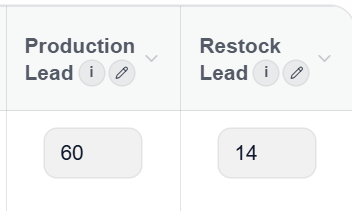
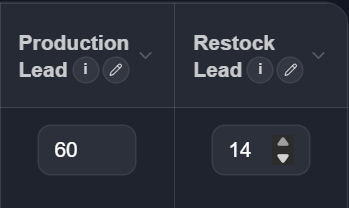
Two lead times, two questions
Production Lead Time
"If I place an order with my supplier today, how many days until it lands somewhere I can sell from?"
That's your Production Lead Time. It's the full pipeline: production at the factory, shipping, customs, freight to Amazon, check-in, and being made available. Whatever the total elapsed time is between clicking "confirm" on a PO and the units becoming sellable — that's the number.
Typical values: 30 – 90 days depending on your supply chain.
Restock Lead Time
"If I initiate a transfer from AWD or my external warehouse into FBA (or from my external warehouse into my FBM stock) today, how many days until it's sellable?"
That's your Restock Lead Time. It only applies when you have a buffer of stock that you can shift closer to the customer — either in AWD or in your own warehouse. It's usually much shorter than Production Lead Time, because you already own the stock and only Amazon's internal receiving is in the way.
Typical values: 3 – 14 days.
Where to set them
Each SKU has its own Production Lead and Restock Lead cell in the inventory table. Click the cell, type a number of days, press Tab. Saves instantly.
You can set different lead times for different SKUs — a fast-turnaround domestic vendor might be 21 days, while an overseas manufacturer might be 75 days. Set each one to the truth for that specific product.
Why they matter
The two lead times feed different parts of the forecasting logic:
- Reorder recommendations (in the Total Inventory column) use Production Lead — because reordering means placing a new supplier order.
- Transfer recommendations (in the Sellable Inventory column) use Restock Lead — because transferring means moving existing stock, not making new stock.
- Stock Health chips use whichever lead time is applicable: if you have transferrable stock (AWD or external), the Sellable chip uses Restock Lead; otherwise it falls back to Production Lead. The Total Inventory chip always uses Production Lead.
If Production Lead is wrong
- Setting it too low → Reorder In dates are too late → you'll run out.
- Setting it too high → you'll always be told to order Now → you'll overstock and pay long-term storage fees.
If Restock Lead is wrong
- Setting it too low → the Sellable chip stays green longer than it should → you'll get surprised by stockouts.
- Setting it too high → the Sellable chip goes red too early → constant transfer alerts on healthy SKUs.
Practical tips
- Update after every real order. When a PO takes 10 days longer than expected, edit the number. The system learns from your reality, not an average.
- Bake in customs and receiving time. The lead time is from your PO to sellable, not to "at Amazon's door".
- Different marketplaces, different rows. A SKU that sells in the US and EU shows up as two rows. If the supply chain to each region is different, set different lead times for each.
- AWD or external not in play? Restock Lead is ignored. If you go direct-to-FBA and have no buffer warehouse, the Sellable chip will just use Production Lead automatically — you can leave Restock Lead at any value.