Inventory Brake
Inventory Brake pauses your product ads when the SKU is running low on stock, and resumes them when supply recovers. It's the one algorithm that reaches outside the ads world and reads directly from your Inventory module.
Why is this an ad automation and not an inventory feature? Because Amazon's ad system will happily keep spending your budget even after your listing has gone out of stock — driving clicks that can't convert. Inventory Brake is the wall between those two systems.
What it can be applied to
Campaigns, Ad Groups, and Products. The action always lands at the product-ad level (that's what actually gets paused when a SKU runs low), but you can attach the algorithm at any tree level — attaching at a higher level just means every product ad underneath is covered.
The setup — one flat table
Unlike the other algorithms, Inventory Brake doesn't have a wizard. The table is the configuration.
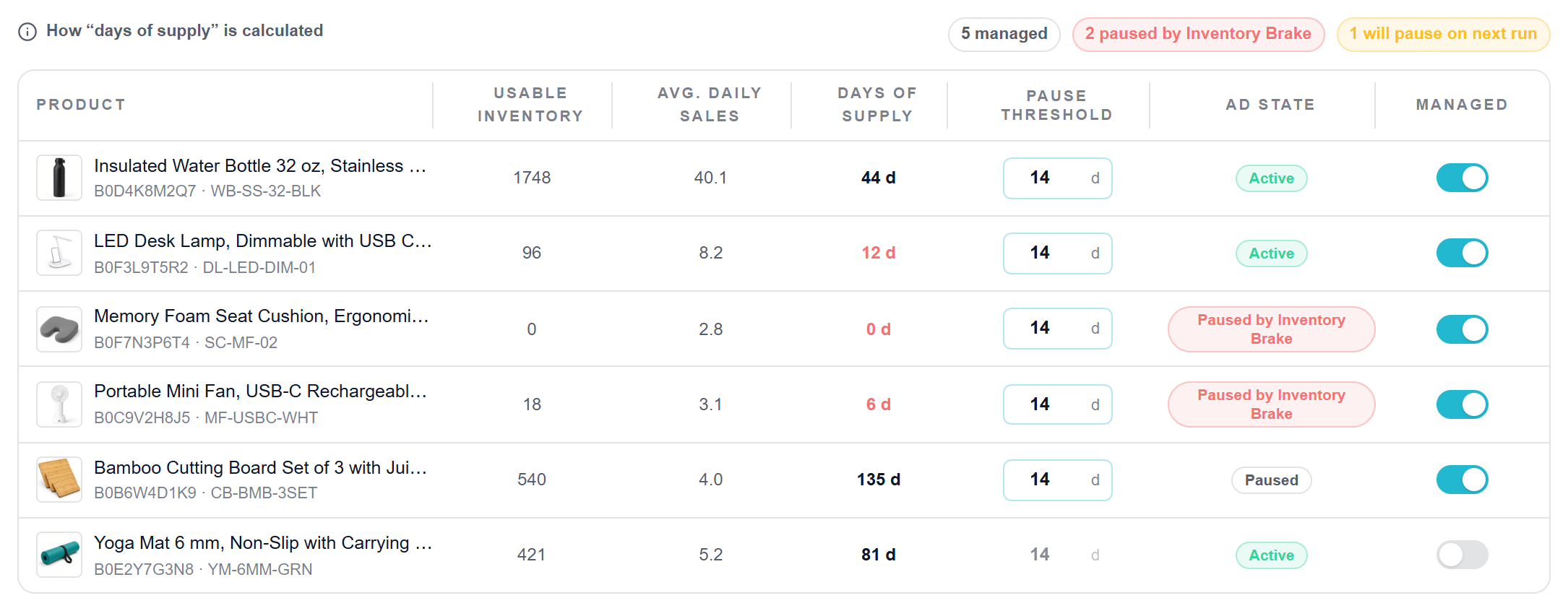
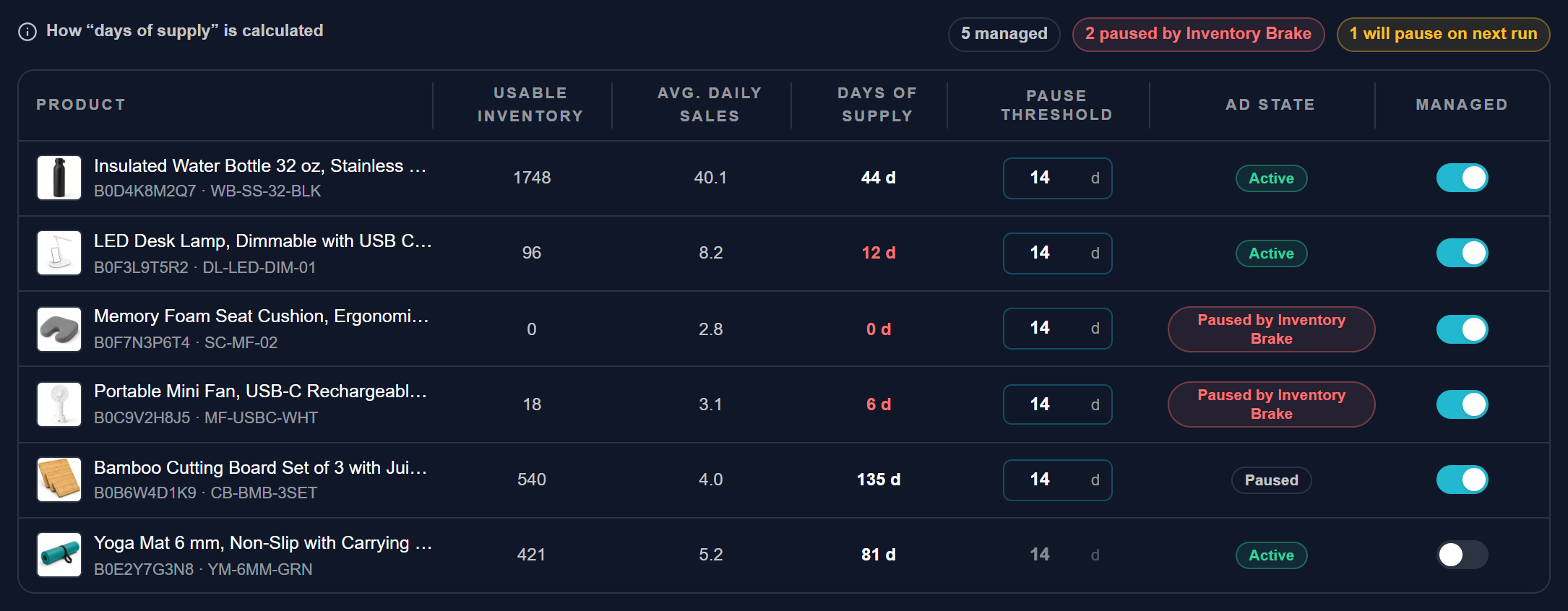
Every product (ASIN × SKU) under the assignment gets its own row. For each row you get:
- Product — image, title, ASIN, SKU, and a small badge if the SKU is advertised in more than one ad under this assignment.
- Usable inventory — the number Inventory Brake feeds into its days-of-supply math (see the info popover).
- Avg. daily sales — your blended velocity (7d / 30d), same number as on the Inventory page.
- Days of supply — how many days at that velocity the usable inventory will last. Turns red when it's at or below the row's pause threshold.
- Pause threshold — the days-of-supply value that triggers a pause on this row. Editable inline (Enter or blur to commit). Default: 14 days. Range: 1–365.
- Ad state — what the product's ad is doing on Amazon right now:
- Active — the ad is running.
- Paused by Inventory Brake — Inventory Brake paused it for low stock, and will resume it when supply recovers.
- Paused — paused for another reason (by you in Amazon, or by another algorithm). Inventory Brake won't resume it.
- Partly active — the product has more than one ad here, and only some of them are running.
- Managed — the toggle that decides whether Inventory Brake watches this product. Turning it off doesn't pause or resume anything by itself; it only tells Inventory Brake to leave the product alone.
At the top-right of the table, a live summary shows:
- N managed — how many products Inventory Brake is watching.
- N paused by Inventory Brake — how many products are paused by Inventory Brake right now (red).
- N will pause on next run — how many products still have a running ad but are already at or below their threshold, so the next run will pause them (amber). Hidden when there are none.
- N no inventory data — how many rows Inventory Brake will have to skip because we don't have a fresh stock number for them.
Opt-out semantics
By default, every product under the assignment is enabled at the default 14-day threshold — even if no row exists for it yet in your saved settings. This is deliberate: when you drop Inventory Brake on a campaign and don't touch anything, the safety net is already on. You only need the table to opt individual SKUs out, or to raise / lower specific thresholds.
Products that appear in the campaign after you configured the rule (new launches, freshly-added ASINs) stay untouched by that opt-out — they inherit the default. To ignore a specific SKU going forward, flip its toggle off.
How "days of supply" is calculated
Click the small How "days of supply" is calculated info button above the table to see the formula popover.
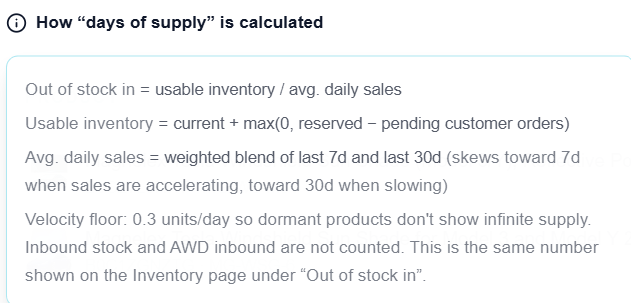
The rules are:
- Out of stock in =
usable inventory / avg. daily sales - Usable inventory =
current + max(0, reserved − pending customer orders)— sellable stock right now, ignoring inbound. - Avg. daily sales = a weighted blend of the last 7 days and last 30 days (skews toward 7d when sales are accelerating, toward 30d when slowing).
- Velocity floor: 0.3 units/day, so dormant products don't show an infinite supply.
This is the same Out of stock in number shown on the Inventory page — Inventory Brake and the Inventory table read from the exact same calculation. So if the number lines up there, it lines up here.
Important: inbound FBA shipments and AWD inbound units are not counted toward usable inventory. Inventory Brake protects you against being seen as out of stock right now, not against a temporary dip that new shipments will cover. If you want a more generous view, raise the threshold instead.
What actually happens on a run
A run happens immediately when you hit Launch to Amazon (and again whenever you save changes while it's live), then once a day at the marketplace's local midnight — so daily-scoped decisions land at local 00:00, not at some random UTC moment. Each run:
- For every product ad under the assignment, look up its current days-of-supply.
- If
days_of_supply ≤ thresholdand the row is enabled: pause the product ad. - If
days_of_supply > thresholdand the pause was owned by Inventory Brake: resume the product ad. - If there's no inventory data (a brand-new listing, an Amazon sync gap): skip the SKU entirely.
Pause ownership
Inventory Brake only lifts the pauses it made itself. If you had already manually paused a product ad in Amazon, or Stop-Loss paused it, or a Rank Guard defence window is holding it paused, Inventory Brake won't touch it. When it comes time to lift one of its own pauses, it verifies ownership first.
Conversely, other automations respect Inventory Brake pauses:
- Dayparting won't re-enable an Inventory Brake pause.
- Rank Guard respects Inventory Brake pauses — it never overrides a stock-related pause.
Interactions with other algorithms
- Inventory page changes — if you edit an SKU's FBM quantity, transfer stock in from AWD, or edit lead times, the next hour's evaluation uses the fresh numbers. No cache to fight.
- Stop-Loss — orthogonal; each owns its own pauses.
- Rank Guard — respects Inventory Brake pauses (never overrides).
- Dayparting — will not resume an Inventory Brake pause.
Common questions
What if I'd rather set a units threshold, not a days threshold?
Not supported today. Days of supply is the right unit for velocity-adjusted decisions (200 units is a year for a slow seller and three days for a fast one), and it's what the Inventory page uses everywhere.
Doesn't the Inventory page also have a "Total inventory" days number that includes inbound?
Yes — the Inventory page shows both a Sellable and a Total days-of-supply. Inventory Brake uses the Sellable side (usable inventory only, no inbound). If you want to be lenient about SKUs that have shipments on the way, raise the threshold instead of switching to Total — the threshold is the right knob for that.
What happens if I set the threshold really high, like 90 days?
The algorithm will happily pause anything with fewer than 90 days of supply. That's a conservative policy — great for high-margin products where you never want to be caught oversold. Just make sure you can replenish that fast, otherwise ads will stay paused most of the time.
Can I have different thresholds for different SKUs?
Yes — that's the whole point of the per-product table. Set 30 days on your fragile-supply hero SKU, 7 days on a plentiful commodity.
What does the summary counter "will pause on next run" mean exactly?
It counts the managed products that still have a running ad and have days_of_supply ≤ threshold right now. Those ads are paused on the next run — within moments of hitting Launch to Amazon (or saving while live), otherwise at the next local midnight. If that number is higher than you expect, review your thresholds first. Products that are already paused are not counted here; they show up under "paused by Inventory Brake".
A product shows "Paused" but not "Paused by Inventory Brake". Why?
Its ad was paused by something else — you paused it in Amazon, or another algorithm did. Inventory Brake only resumes the pauses it made itself, so it leaves that ad as it is.